ScopeSift vs. On-Screen Takeoff
Get AI siding elevations and duct paths in your browser. On-Screen Takeoff’s main workspace is a Windows application.
One eligible first takeoff free. No credit card required.
| Feature | ScopeSiftAI trade takeoff | On-Screen TakeoffProfessional |
|---|---|---|
| Siding on elevations | AIAreas, openings + trim | ManualAI excludes elevations |
| HVAC duct takeoff | AIPaths, sizes + systems | ManualLinear + duct tools |
| Edit takeoff on your plans | IncludedEdit shapes + quantities | IncludedCorners + cutouts |
| Add prices + export | IncludedExcel, CSV + PDF | IncludedQuick Bid bundle |
| Area geometry | AISiding polygons | AIFloor-plan areas |
| Line geometry | AIDucts + siding trim | AIStraight walls |
| Object counting | AITrade devices | AssistedSample / label search |
| Workspace | BrowserNo desktop installation | Windows desktopSeparate browser trial |
| Payment model | Single takeoffOr subscribe monthly | Quoted subscriptionProfessional tier |
| Published pricePlan shown above | USD 50 onceor USD 299/month 10 takeoffs includedPricing details | Contact vendorsubscription quote |
| Monthly paymentsContract term shown above | USD 299/month10 takeoffs · one user Renews monthly | Quote requiredConfirm billing and term |
Published plans and documented workflows. Pricing reviewed October 6, 2026. Prices shown in dollars; taxes, discounts and add-ons may vary. See sources and qualifications below.
Documented featureAssisted You select regions or examplesManual You draw the measurements
Cited workflows, checked October 8, 2026. Labels describe the method, not every capability a product may offer. Review AI quantities before bidding.
How the workflows compare
ScopeSift drafts siding areas, openings and trim from elevations, plus HVAC duct paths. On-Screen Takeoff’s BOOST generates editable floor-plan areas and walls but excludes elevations from Auto Takeoff. Manual elevation tools and duct calculations remain available.
Detailed workflow comparison
- Area geometry
- ScopeSift: AI draws editable siding-surface and opening polygons on source PDF sheets.
- On-Screen Takeoff: BOOST creates editable footprint/net/ceiling areas from floor/enlarged floor plans.
- Line geometry
- ScopeSift: AI traces duct paths and siding trim. Electrical lengths use explicitly drawn routes, not inferred installed wiring.
- On-Screen Takeoff: BOOST generates straight-wall and wall-painting takeoff geometry. Manual paths and duct-surface calculations are also available.
- Siding elevation workflow
- ScopeSift: AI reads elevation material labels and produces siding areas, opening deductions and trim drafts.
- On-Screen Takeoff: BOOST Auto Takeoff explicitly excludes elevation, section and detail plans. The application retains manual elevation takeoff tools.
- HVAC duct workflow
- ScopeSift: AI produces editable duct paths and lengths, with quantities grouped by recorded size and system.
- On-Screen Takeoff: Users draw linear duct conditions and apply All Side/Duct calculations. BOOST Auto Takeoff's published automatic objects are floor-plan areas, walls, windows and other counts.
- Edit results on the drawing
- ScopeSift: Edit vertices, redraw runs, adjust count markers or remove shapes; saved quantities update with the geometry.
- On-Screen Takeoff: Users move AI-area corners/edges, add/remove vertices, split shapes and add backouts, changing measured quantities.
- Object counting
- ScopeSift: AI counts HVAC equipment and air devices, electrical devices and other objects in the selected trade scope.
- On-Screen Takeoff: Professional includes Core’s unlimited Auto Takeoff plus sample/label Auto Count. Essential/Plus limit Auto Takeoff to five projects.
- Where you work
- ScopeSift: In your browser. No desktop installation.
- On-Screen Takeoff: Windows application; a separate browser-based BOOST trial is available.
- From quantities to estimate
- ScopeSift: Edit the drawing, add your prices, and export CSV, Excel or an estimate PDF.
- On-Screen Takeoff: Professional and Plus bundle Quick Bid estimating with On-Screen Takeoff and Digital Production Control.
- Paid options
- ScopeSift: Buy a single takeoff or choose a monthly subscription.
- On-Screen Takeoff: Essential, Core, Plus and Professional subscription tiers. ConstructConnect provides pricing based on licensing and business needs.
The comparison uses the documented Professional subscription bundle. The separate browser BOOST trial is a single-page demonstration, not the installed Windows workspace. Legacy licenses and other tiers have different automation allowances.
Vendor sources: OST AI scope and excluded drawing types; OST correcting AI takeoff geometry; OST BOOST Auto Count; OST manual linear and duct calculations; On-Screen Takeoff and Takeoff BOOST; On-Screen Takeoff subscription bundles; Takeoff BOOST access; Official desktop system requirements. Pricing reviewed October 6, 2026. ScopeSift pricing.
Features and plan availability can change. Review AI quantities before bidding.
From your plans to an estimate.
AI counts and traces one trade per run: HVAC, siding or electrical. Inspect the drawing, make edits and add your own prices.
Watch the demo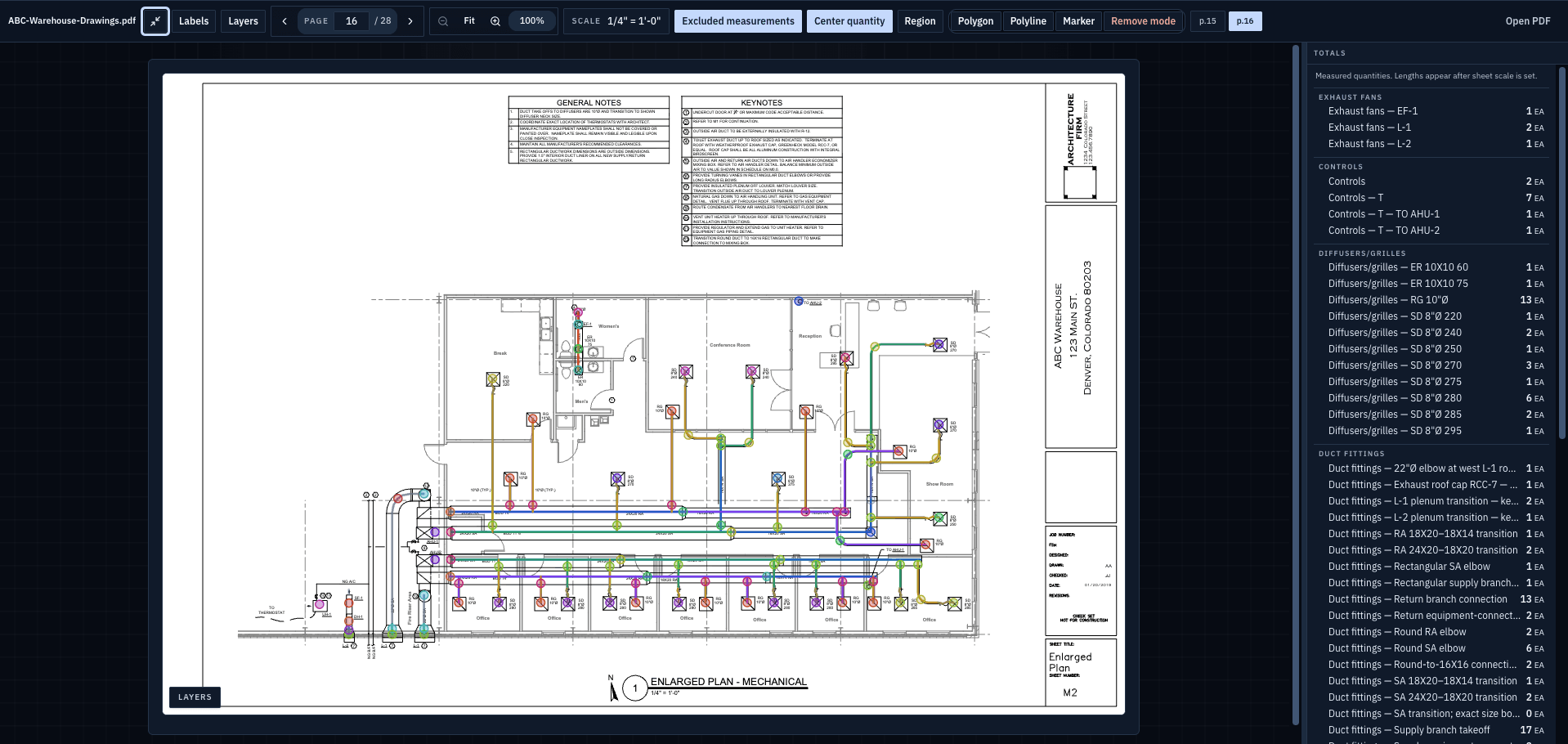
On-Screen Takeoff is a trademark of its respective owner. ScopeSift is not affiliated with or endorsed by On-Screen Takeoff.