ScopeSift vs. Bluebeam
Start with AI counts and traced measurements for your trade. Edit and price them in your browser, with single-takeoff or monthly billing.
One eligible first takeoff free. No credit card required.
| Feature | ScopeSiftAI trade takeoff | BluebeamComplete |
|---|---|---|
| Siding on elevations | AIAreas, openings + trim | AssistedSelect PDF regions |
| HVAC duct takeoff | AIPaths, sizes + systems | AssistedSelect each duct region |
| Edit takeoff on your plans | IncludedEdit shapes + quantities | IncludedPDF control points |
| Add prices + export | IncludedExcel, CSV + PDF | IncludedFormulas + Excel link |
| Area geometry | AISiding polygons | AssistedDynamic Fill |
| Line geometry | AIDucts + siding trim | AssistedFill or draw paths |
| Object counting | AITrade devices | AssistedVisualSearch |
| Workspace | BrowserNo desktop installation | Windows Revu + webDifferent measurement tools |
| Payment model | Single takeoffOr subscribe monthly | Annual subscriptionComplete plan |
| Published pricePlan shown above | USD 50 onceor USD 299/month 10 takeoffs includedPricing details | $440/yearper user · annual billing |
| Monthly paymentsContract term shown above | USD 299/month10 takeoffs · one user Renews monthly | Annual billing onlyNo monthly option |
Published plans and documented workflows. Pricing reviewed October 6, 2026. Prices shown in dollars; taxes, discounts and add-ons may vary. See sources and qualifications below.
Documented featureAssisted You select regions or examplesManual You draw the measurements
Cited workflows, checked October 8, 2026. Labels describe the method, not every capability a product may offer. Review AI quantities before bidding.
How the workflows compare
ScopeSift starts with AI-generated counts and traced measurements for your chosen trade. Bluebeam combines Revu’s PDF measurement tools with drawing review and collaboration; Max adds AI drawing reviews and comparisons.
Detailed workflow comparison
- Area geometry
- ScopeSift: AI draws editable siding-surface and opening polygons on source PDF sheets.
- Bluebeam: Dynamic Fill turns PDF regions that a user selects into editable area and polygon measurements.
- Line geometry
- ScopeSift: AI traces duct paths and siding trim. Electrical lengths use explicitly drawn routes, not inferred installed wiring.
- Bluebeam: Complete offers Dynamic Fill polylength measurement and manually drawn length/polylength tools. Max separately offers AI markup creation and shape modification.
- Siding elevation workflow
- ScopeSift: AI reads elevation material labels and produces siding areas, opening deductions and trim drafts.
- Bluebeam: Select closed façade regions with Dynamic Fill to create area or polygon marks. The user chooses and marks each region.
- HVAC duct workflow
- ScopeSift: AI produces editable duct paths and lengths, with quantities grouped by recorded size and system.
- Bluebeam: Bluebeam's HVAC example selects each duct route inside its PDF boundaries with Dynamic Fill and creates colored polygons. Length and polylength tools measure drawn routes.
- Edit results on the drawing
- ScopeSift: Edit vertices, redraw runs, adjust count markers or remove shapes; saved quantities update with the geometry.
- Bluebeam: PDF measurement markups have editable control points and cutouts. Max AI markups belong to a separate plan.
- Object counting
- ScopeSift: AI counts HVAC equipment and air devices, electrical devices and other objects in the selected trade scope.
- Bluebeam: VisualSearch matches selected graphical symbols and applies count marks to user-confirmed results. Complete adds Dynamic Fill for assisted measurements.
- Where you work
- ScopeSift: In your browser. No desktop installation.
- Bluebeam: Revu runs on Windows; included web tools support length, area and count measurements. Desktop and web toolsets differ.
- From quantities to estimate
- ScopeSift: Edit the drawing, add your prices, and export CSV, Excel or an estimate PDF.
- Bluebeam: Custom calculation columns; Excel Quantity Link in Complete and Max.
- Paid options
- ScopeSift: Buy a single takeoff or choose a monthly subscription.
- Bluebeam: Complete is $440/user/year with an annual contract and annual billing. Max AI review/comparison features belong to the separate $590/user/year introductory plan.
The named price is Complete. Max AI markup creation/review is a separate $590/user/year introductory plan with desktop/version/provider requirements; it is not included in Complete. Dynamic Fill requires the user to select each PDF region.
Vendor sources: Bluebeam editable area measurements; Bluebeam Max AI markup requirements; Bluebeam plans and capabilities; Bluebeam VisualSearch counts; Bluebeam Dynamic Fill; Bluebeam Quantity Link; Bluebeam annual subscription terms; Bluebeam web measurements. Pricing reviewed October 6, 2026. ScopeSift pricing.
Features and plan availability can change. Review AI quantities before bidding.
From your plans to an estimate.
AI counts and traces one trade per run: HVAC, siding or electrical. Inspect the drawing, make edits and add your own prices.
Watch the demo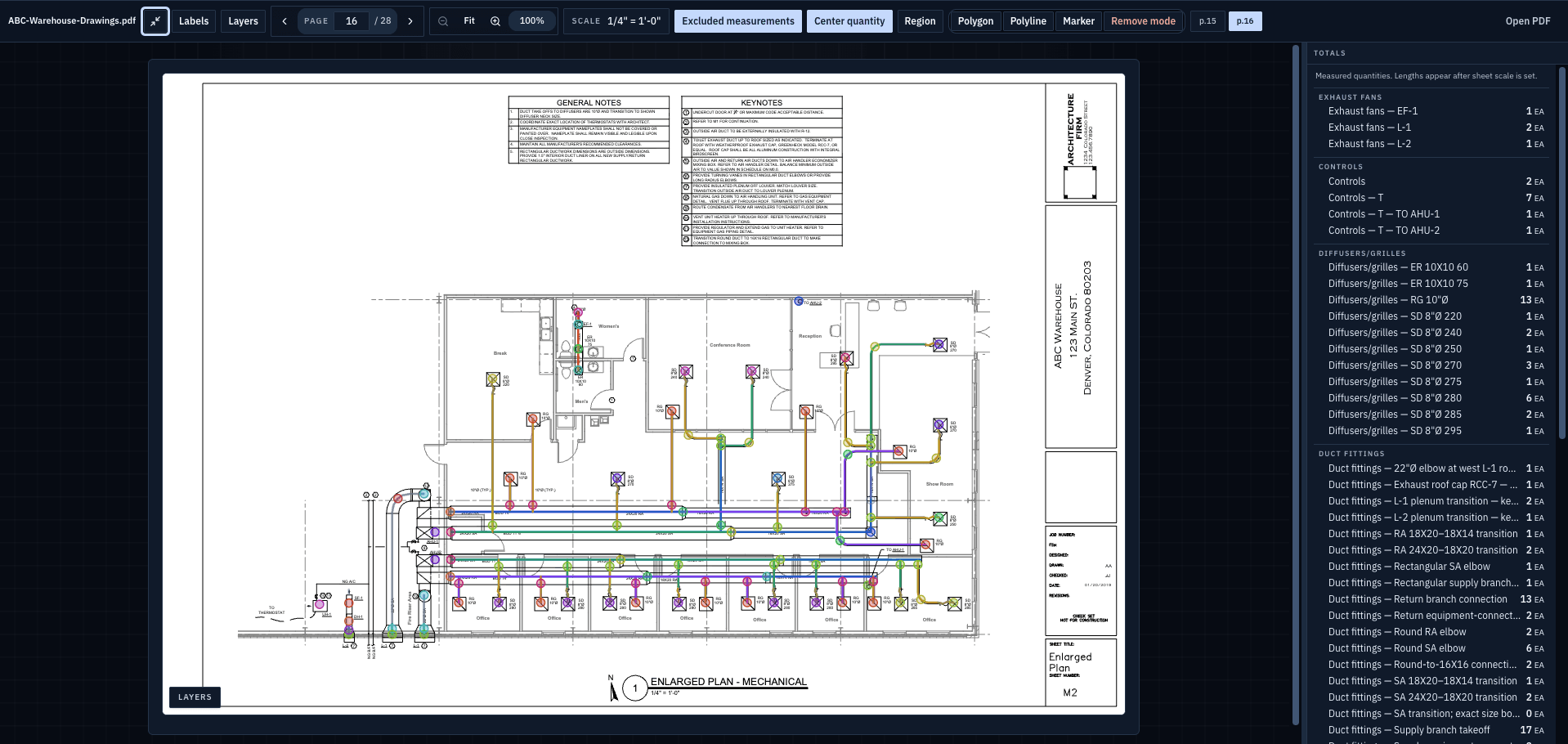
Bluebeam is a trademark of its respective owner. ScopeSift is not affiliated with or endorsed by Bluebeam.